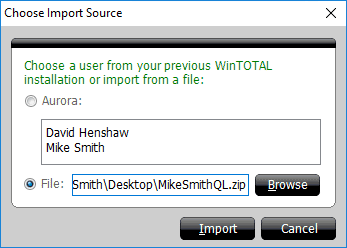
To import your QuickLists from a previous installation of WinTOTAL Aurora on
your computer:
- In the Forms PowerView, click the
Settings icon (
 ) in the QuickList Pane.
- From the Choose your preferred QuickList section, click
the Add Text Database icon (
 ) .
Or, simply select a Text Database to be overwritten by the imported Text
Database using the drop‑down menu.
) .
Or, simply select a Text Database to be overwritten by the imported Text
Database using the drop‑down menu.
- Click the Import icon (
 ) to the right. TOTAL
scans your PC for installations of previous versions of WinTOTAL Aurora. If
any are found, they are displayed. Select the one you want to use and click
Import.
) to the right. TOTAL
scans your PC for installations of previous versions of WinTOTAL Aurora. If
any are found, they are displayed. Select the one you want to use and click
Import.
If no previous versions of WinTOTAL Aurora are found you can also import a
QuickList file that came from WinTOTAL Aurora on a different PC. Click here for instructions.